
Qualia Supplements Help & Frequently Asked Questions
< Back to FAQs
Account & Subscription
Account
How to Access and Manage your Account and Subscription/s
You can manage your account, adjust your subscription, update billing, shipping, and payment information, change the date of your next shipment, cancel your subscription, and more by following the steps below.
- Log In to Your Qualia Life Sciences Account
You can reset your password here, if needed: https://www.qualialife.com/forgot
- Once logged in, click the account icon in the right hand corner. From there, you’ll be able to Your Subscription, Order History, or Logout from the drop down menu
- Your subscription-> Subscription management page. You may need to scroll down to view all of your previous subscriptions, active and inactive.
Cancel Subscription is used to terminate a subscription.
Manage Subscription will allow you to pause your subscription, change your shipping address or method (Standard vs Priority), edit the Renewal Frequency, subsequent renewal date, enter a discount code, or change the payment method on file (unless your subscription is tied to AmazonPay)
On the lefthand Account Settings menu:
Account Settings/General Settings
Allows you to change the name and/or email address on your account.
Password
- Allows you to change the password on your account
Order History
- Allows you to view your complete order history and which subscription, if applicable, the order was tied to.
- Order details reflects the shipping address, price breakdown, tracking number, and payment method for each order.
Qualia Rewards
- Allows you to view your Qualia Rewards activity, including accrual and use.
Subscriber Benefits
- Allows you to view the benefits you have access to as a Qualia Life Sciences subscriber.
How does the Subscribe and Save program work?
When you click on "subscribe & save" for a product, it qualifies you for the first time subscriber first order promotional price, and signs you up for our subscription model which makes sure our customers do not run out of product by shipping at a default of every 4 weeks and also receive our subscription discount of 15%. The subscription frequency and next renewal date can be adjusted at any time.
As you will see on the order page on qualialife.com, subscriptions offer 50%-75% (depending on the product) off of your first order, and an ongoing subscription discount for each renewal. This is to allow customers to try our products and see if they are the right fit for you and your individual biochemistry.
Keep in mind, subscriptions can be cancelled at any time; there is no minimum timeline or contract. Subscriptions can be cancelled from within your account, or if you have any trouble, please reach out to us at [email protected] and we'll be happy to assist.
How to ensure you receive our emails
Services like Gmail, Outlook.com and Yahoo! Mail block some email that they may not recognize or may put some emails into “promotional” sections of your inbox.
If you ask your email provider to unblock or an email address then email from that address will be more likely to get through to your inbox.
Ways to make sure you receive all future order information, and updates.
Add our address to your contacts
Add our email [email protected] to your Contacts. Your mail service will usually deliver email from addresses that are in your Contacts.
Mark messages as ‘Not spam’
If your mail service has marked us as spam, make sure to update it.
- Navigate to the spam folder.
- Search for Qualia
- Select all the emails shown.
- Click More and then Not spam
Move emails from Promotions to your Inbox (Gmail)
To make sure our emails hit your inbox you can move them from the promotions folder directly to your inbox.
How do I Unsubscribe From Your Email List?
We are sorry to see you go...
If you aren't getting any value from our emails then we do not want to bother you with them any longer.
Please unsubscribe here.
Subscription
How can I cancel my subscription?
You can cancel your subscription at anytime by logging into your account and managing your subscription.
To manage your subscription, including cancellation, please:
1. Log in to your account on the Qualia website: https://qualialife.com/signin
2. Click on the account icon in the top right and then 'Your Subscriptions' from the dropdown to see your full list of subscriptions. 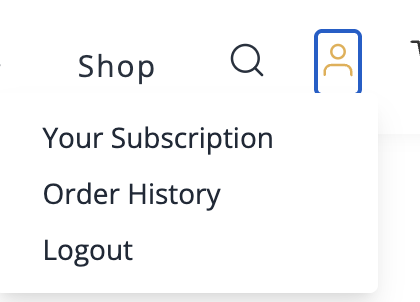 3. Click the "Cancel Subscription" button if you'd like to cancel your subscription.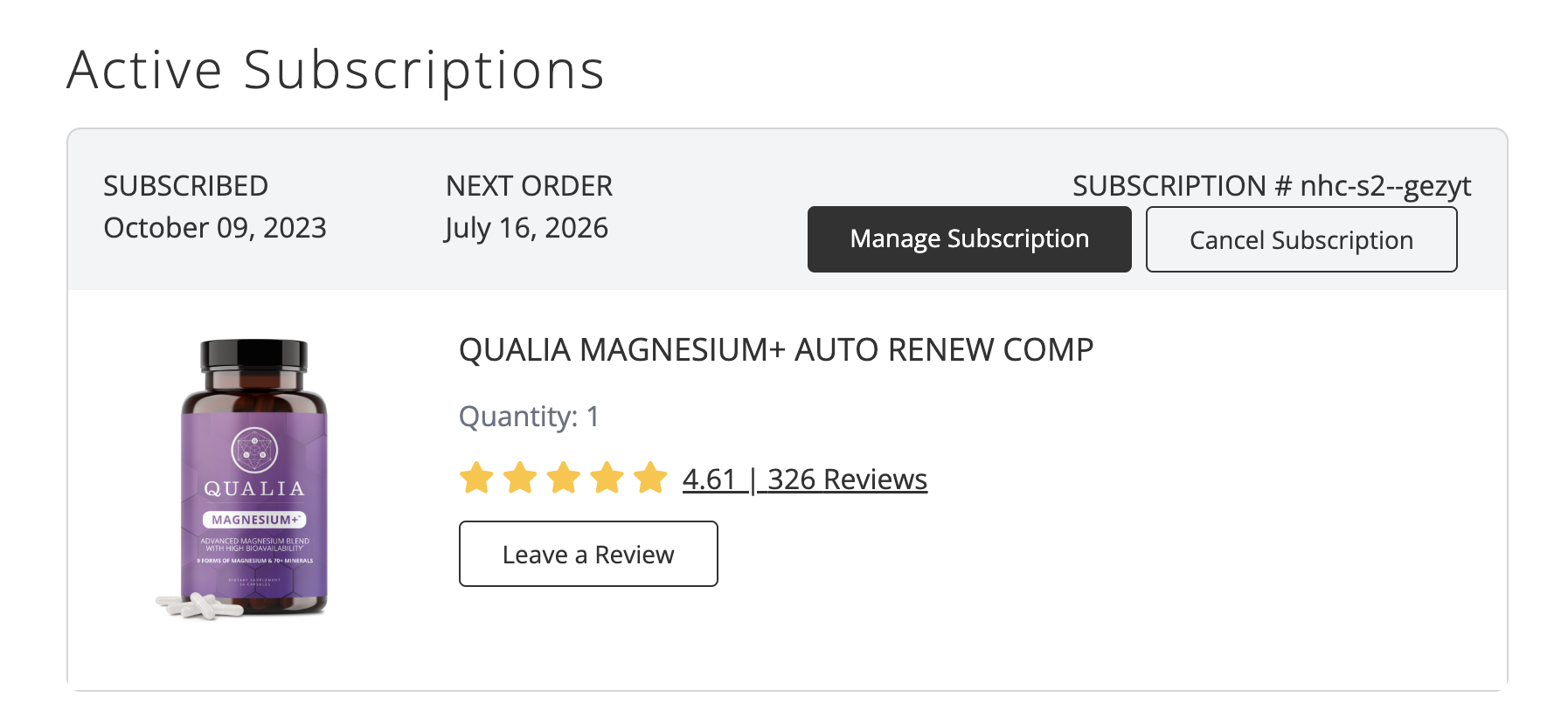
4. Select 'Manage Subscription' in order to edit and customize the renewal date and/or frequency, shipping/billing address, and product quantity of your Qualia subscription.
5. To pause your subscription, from the 'Manage Subscription' page, select 'Pause Subscription' and then select the time frame you'd like to pause your subscription for.
If you need to reset your password you can do so here: https://qualialife.com/forgot
How to Add a Coupon to a Subscription
To view and manage your account, including current status and order history, order recurrence, changing your password, updating the shipping address/es, and/or changing your payment method/s, please login to your account.
To manage your subscription, including current status and order history, order recurrence, account password shipping/billing address, payment method, etc please:
1. Log in to your account on the Qualia website: https://qualialife.com/signin
2. Click on 'Your Subscriptions' from the account drop down menu in the top right corner of the page to see your full list of subscriptions.
3. Select 'Manage Subscription' on the relevant subscription, and then 'Edit Subscription Options'
4. On the Edit Subscription Options page, you'll see a box called 'Discount Code' under the Subscription Details section.
5. Enter your discount code and then make sure to hit 'Save.'
If you need to reset your password you can do so here: https://qualialife.com/forgot
Of note: The system only allows 1 coupon code to be used at a time, so if your subscription currently has a coupon code attached to it, you will need to 'Delete' that, and then enter and save the new coupon code.
If you're adding a temporary, one-time coupon code and then wish to revert back to a recurring coupon, login to your account after the 1 time coupon code and corresponding order has shipped, delete that 1 time coupon code and then substitute your recurring one back in. Be sure to hit 'Save' so all processes correctly.